Ask about execution
Investigate task timing, CPU load and lock waits. Follow who blocked whom, then open the matching moment in Trace View.

TraxAI · Available in Traxcope 2.0
TraxAI connects the model you choose to your captured runtime data and Traxcope tools. Ask about delays, lock waits and signals—then inspect the evidence in Trace View or Scope.
TraxAI
From a question to the data behind the answer.
Investigate task timing, CPU load and lock waits. Follow who blocked whom, then open the matching moment in Trace View.
Inspect sampled signals, gaps and frequency components. Compare filter candidates while keeping the original channel visible.
TraxAI can edit source files, design and integrate filters, build, flash and connect the probe. Each change requires your approval.
TraxAI + MCP
Connect your own cloud-provider account or a supported model server in your network. Embedya is not in the runtime-data path. A local model and a suitable licence can support an offline workflow.
Cloud model usage follows your provider’s pricing and data policy.
Use Traxcope’s tools from Claude Code, Claude Desktop, Codex, Cursor, VS Code Copilot, Gemini CLI or Windsurf through MCP. Your AI app can inspect runtime data and drive Traxcope; changes ask for approval in the Traxcope window.
AI setup and documentation →Firmware X-Ray
The runtime can look normal at first glance. Traxcope adds the missing context, exposing timing deviations and abnormal behavior without stopping the system.
The same measurements continue across both views. Inside the X-Ray layer, hidden anomalies become visible in their exact timing and sequence.
TraxAI in paid editions: Use your own cloud provider or local model to explore anomalies and bottlenecks in captured data.
The visibility gap
The bug can disappear the moment you try to observe it.
Real-time behavior, communication and control loops no longer run as they did when the fault occurred.
Added output consumes bandwidth and execution time, potentially masking intermittent faults.
Traxcope brings tasks, interrupts, events, variables and signals onto one synchronized timeline.
One engineering workflow
Capture what happened, preserve the context around it and inspect software and signal behavior together.
Build trigger conditions from variables, events and timing rules. Preserve activity before and after the critical moment.
Synchronize multiple probes, measure cross-device latency and expose timing races on a shared timeline.
Explore streamed signals with scope, FFT, waterfall and 3D spectrum views inside the same workflow.
Inspect RTOS tasks, ISRs, markers, logs, state transitions and live variables without freezing firmware.
See Traxcope in action
The product interface is the proof: precise engineering data, synchronized and ready to investigate.
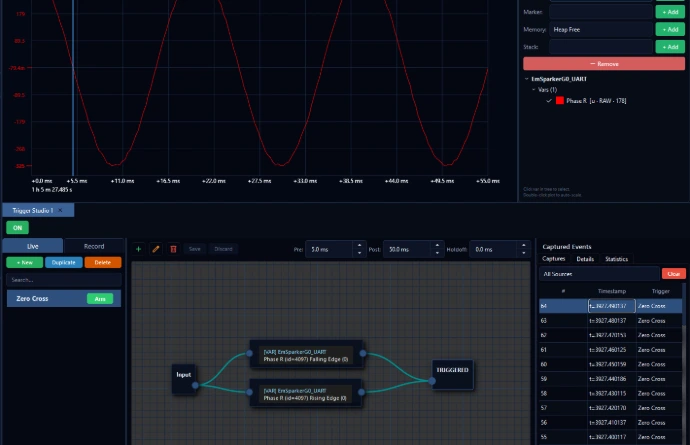
Trigger Studio
Define visual trigger conditions and preserve pre-trigger and post-trigger activity instead of searching through long recordings.
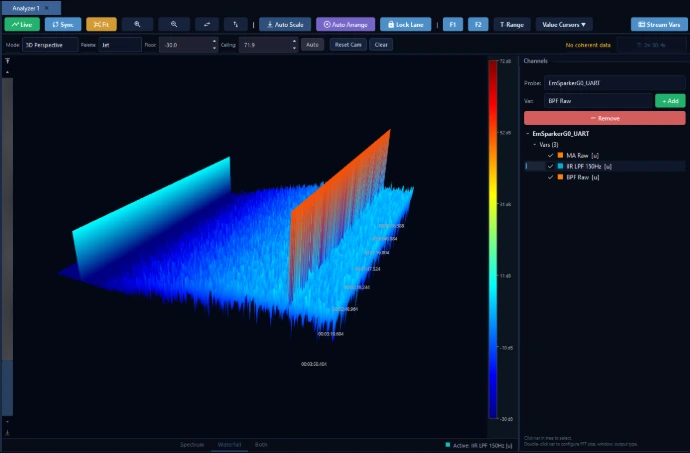
Inspect time-domain and frequency-domain behavior with FFT, waterfall, 3D spectrum and engineering measurements.
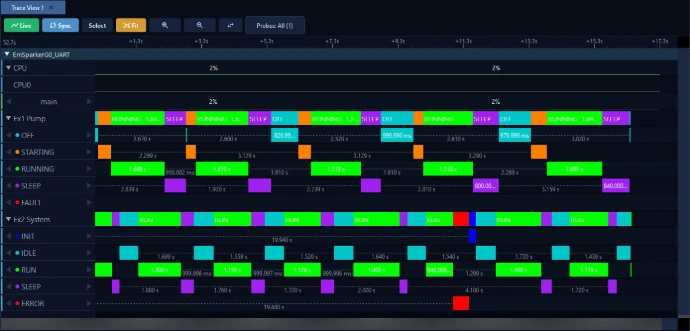
Follow state transitions, task activity, interrupts and events on the same synchronized session.
Product walkthrough
Watch Traxcope in use and get a practical view of the workflow, interface and analysis tools.
How it works
Traxcope adds observability to your current embedded workflow without tying you to a single MCU vendor.
Add the lightweight TraxProbe library and select the variables, events, tasks and signals you need to observe.
Stream diagnostic data through SEGGER RTT, ST-LINK RTT, UART or TCP/IP. Inspect it live or record complete sessions.
Correlate trace, logs, RTOS activity and signals. Apply measurements and triggers to uncover the root cause.
Use the ready-to-run tutorial project and guided video to shorten setup time.
Traxcope 2.0
Task and ISR interactions through queues, mutexes and other kernel objects. The map is available in every edition; the problem list is in paid editions.
Trace Linux applications and VxWorks 7 targets with TraxProbe SDK 2.0. Linux scheduling visibility requires the appropriate perf permissions.
Read RTT through ST-LINK/V2 or V3 on Windows and Linux. Check whether your configured ELF matches the firmware running on the device.
From experience to product
In an earlier project, Traxcope developer Burak Emre Polat spent roughly two months investigating a demanding 33 W / 300 ms regulatory condition. Reproducing the event, building a separate interface and moving the data between disconnected tools made the investigation slow and difficult to verify.
That experience helped shape Traxcope: one environment where engineers can capture the moment, keep its timing context and analyze the data without assembling a new diagnostic workflow for every difficult fault.

Founder of Embedya with more than 15 years of experience across defence, industrial and R&D embedded systems.
Built for demanding embedded work
Find timing faults, scheduling problems and unexpected interactions in complex real-time systems.
Validate embedded behavior earlier and reduce repeated debugging and verification cycles.
Offline activation, floating team licences and air-gapped deployment are available on request.
Monthly or yearly. Your choice.
Start with Community, Standard or Professional. Displayed prices are for online Node-Locked licences. Internet-connected Floating licences also offer monthly or yearly billing by quotation.
Monthly billing costs 20% more over 12 months.
Permanent and free for commercial use. One probe, three live minutes per hour.
One engineer, up to two machines, one at a time. Online Node-Locked licence.
Everything in Standard, plus specialized analysis and automated capture.
For a single computer that never connects to the internet.
Share concurrent seats across an internet-connected team.
Share seats on your own network while only the server connects to the internet.
Shared seats for an isolated network with no internet access.
Tailored licensing for larger organizations and specialized deployments.
Displayed monthly prices apply to online Node-Locked licences. Internet-connected Floating licences also offer monthly billing by quotation; offline and Enterprise options are quoted separately.
Latest stable release
The same installer starts a 14-day Professional trial for a new installation, then continues as the free Community Edition.
No credit card. No account. Continues in Community mode afterwards.
View all releases on GitHubEverything you need to begin
Use the technical guides, ready-to-run projects and short video tutorials to move from installation to real traces quickly.
No. Traxcope is designed to observe software behavior while the firmware continues to run, helping preserve the timing and context you are investigating.
Traxcope supports bare-metal, FreeRTOS and VxWorks 7 workflows, as well as Linux applications with TraxProbe SDK 2.0. The desktop application is available for Windows and Linux. Check the integration guides for your target and required permissions.
Yes. Community is permanent, allows commercial use and requires no account or licence key. It includes core views with one connected probe and three minutes of live streaming per hour.
Traxcope continues in Community mode. You can keep using the free features and request a Standard or Professional licence when you need unlimited streaming, recording or advanced workflows.
Yes. Solo Offline, Floating Team and Enterprise or Air-Gapped licence options are available on request.
TraxAI connects a supported model you choose to runtime data and Traxcope tools. You can use a cloud-provider account or a local model server. AI access is included in Standard and Professional; cloud model usage may have separate provider charges.
Yes, with your approval for each change. TraxAI can edit source files, design filters, build, flash and connect the probe. You remain in control of the proposed actions.
Start with your own firmware
Download Traxcope, make your first connection and explore every Professional feature for 14 days.
TraxAI · Available in Traxcope 2.0
TraxAI connects the model you choose to your captured runtime data and Traxcope tools. Ask about delays, lock waits and signals—then inspect the evidence in Trace View or Scope.
TraxAI
From a question to the data behind the answer.
Investigate task timing, CPU load and lock waits. Follow who blocked whom, then open the matching moment in Trace View.
Inspect sampled signals, gaps and frequency components. Compare filter candidates while keeping the original channel visible.
TraxAI can edit source files, design and integrate filters, build, flash and connect the probe. Each change requires your approval.
TraxAI + MCP
Connect your own cloud-provider account or a supported model server in your network. Embedya is not in the runtime-data path. A local model and a suitable licence can support an offline workflow.
Cloud model usage follows your provider’s pricing and data policy.
Use Traxcope’s tools from Claude Code, Claude Desktop, Codex, Cursor, VS Code Copilot, Gemini CLI or Windsurf through MCP. Your AI app can inspect runtime data and drive Traxcope; changes ask for approval in the Traxcope window.
AI setup and documentation →Firmware X-Ray
The runtime can look normal at first glance. Traxcope adds the missing context, exposing timing deviations and abnormal behavior without stopping the system.
The same measurements continue across both views. Inside the X-Ray layer, hidden anomalies become visible in their exact timing and sequence.
TraxAI in paid editions: Use your own cloud provider or local model to explore anomalies and bottlenecks in captured data.
The visibility gap
The bug can disappear the moment you try to observe it.
Real-time behavior, communication and control loops no longer run as they did when the fault occurred.
Added output consumes bandwidth and execution time, potentially masking intermittent faults.
Traxcope brings tasks, interrupts, events, variables and signals onto one synchronized timeline.
One engineering workflow
Capture what happened, preserve the context around it and inspect software and signal behavior together.
Build trigger conditions from variables, events and timing rules. Preserve activity before and after the critical moment.
Synchronize multiple probes, measure cross-device latency and expose timing races on a shared timeline.
Explore streamed signals with scope, FFT, waterfall and 3D spectrum views inside the same workflow.
Inspect RTOS tasks, ISRs, markers, logs, state transitions and live variables without freezing firmware.
See Traxcope in action
The product interface is the proof: precise engineering data, synchronized and ready to investigate.
Trigger Studio
Define visual trigger conditions and preserve pre-trigger and post-trigger activity instead of searching through long recordings.
Inspect time-domain and frequency-domain behavior with FFT, waterfall, 3D spectrum and engineering measurements.
Follow state transitions, task activity, interrupts and events on the same synchronized session.
Product walkthrough
Watch Traxcope in use and get a practical view of the workflow, interface and analysis tools.
How it works
Traxcope adds observability to your current embedded workflow without tying you to a single MCU vendor.
Add the lightweight TraxProbe library and select the variables, events, tasks and signals you need to observe.
Stream diagnostic data through SEGGER RTT, ST-LINK RTT, UART or TCP/IP. Inspect it live or record complete sessions.
Correlate trace, logs, RTOS activity and signals. Apply measurements and triggers to uncover the root cause.
Use the ready-to-run tutorial project and guided video to shorten setup time.
Traxcope 2.0
Task and ISR interactions through queues, mutexes and other kernel objects. The map is available in every edition; the problem list is in paid editions.
Trace Linux applications and VxWorks 7 targets with TraxProbe SDK 2.0. Linux scheduling visibility requires the appropriate perf permissions.
Read RTT through ST-LINK/V2 or V3 on Windows and Linux. Check whether your configured ELF matches the firmware running on the device.
From experience to product
In an earlier project, Traxcope developer Burak Emre Polat spent roughly two months investigating a demanding 33 W / 300 ms regulatory condition. Reproducing the event, building a separate interface and moving the data between disconnected tools made the investigation slow and difficult to verify.
That experience helped shape Traxcope: one environment where engineers can capture the moment, keep its timing context and analyze the data without assembling a new diagnostic workflow for every difficult fault.
Founder of Embedya with more than 15 years of experience across defence, industrial and R&D embedded systems.
Built for demanding embedded work
Find timing faults, scheduling problems and unexpected interactions in complex real-time systems.
Validate embedded behavior earlier and reduce repeated debugging and verification cycles.
Offline activation, floating team licences and air-gapped deployment are available on request.
Monthly or yearly. Your choice.
Start with Community, Standard or Professional. Displayed prices are for online Node-Locked licences. Internet-connected Floating licences also offer monthly or yearly billing by quotation.
Monthly billing costs 20% more over 12 months.
Permanent and free for commercial use. One probe, three live minutes per hour.
One engineer, up to two machines, one at a time. Online Node-Locked licence.
Everything in Standard, plus specialized analysis and automated capture.
For a single computer that never connects to the internet.
Share concurrent seats across an internet-connected team.
Share seats on your own network while only the server connects to the internet.
Shared seats for an isolated network with no internet access.
Tailored licensing for larger organizations and specialized deployments.
Displayed monthly prices apply to online Node-Locked licences. Internet-connected Floating licences also offer monthly billing by quotation; offline and Enterprise options are quoted separately.
Latest stable release
The same installer starts a 14-day Professional trial for a new installation, then continues as the free Community Edition.
No credit card. No account. Continues in Community mode afterwards.
View all releases on GitHubEverything you need to begin
Use the technical guides, ready-to-run projects and short video tutorials to move from installation to real traces quickly.
No. Traxcope is designed to observe software behavior while the firmware continues to run, helping preserve the timing and context you are investigating.
Traxcope supports bare-metal, FreeRTOS and VxWorks 7 workflows, as well as Linux applications with TraxProbe SDK 2.0. The desktop application is available for Windows and Linux. Check the integration guides for your target and required permissions.
Yes. Community is permanent, allows commercial use and requires no account or licence key. It includes core views with one connected probe and three minutes of live streaming per hour.
Traxcope continues in Community mode. You can keep using the free features and request a Standard or Professional licence when you need unlimited streaming, recording or advanced workflows.
Yes. Solo Offline, Floating Team and Enterprise or Air-Gapped licence options are available on request.
TraxAI connects a supported model you choose to runtime data and Traxcope tools. You can use a cloud-provider account or a local model server. AI access is included in Standard and Professional; cloud model usage may have separate provider charges.
Yes, with your approval for each change. TraxAI can edit source files, design filters, build, flash and connect the probe. You remain in control of the proposed actions.
Start with your own firmware
Download Traxcope, make your first connection and explore every Professional feature for 14 days.